
Updated on : 28-11-2025
Table of Contents
Introduction
The academic landscape has transformed dramatically, with AI tools for students becoming not just helpful supplements but essential study companions. Among the various educational AI tools available, Claude AI for students has emerged as a particularly powerful resource that’s changing how learning happens in 2026.
What makes Claude AI stand out isn’t just its technical capabilities—it’s the clarity, accuracy, and depth of understanding it brings to complex topics. Students struggling with coding assignments, preparing for exams, or trying to grasp difficult concepts find that this AI study companion provides explanations that actually make sense. The AI-powered study tool has become especially popular for its ability to break down complicated subjects into digestible pieces without losing important details.
For many students, particularly those in technical fields like BCA (Bachelor of Computer Applications), Claude has become an indispensable homework helper AI. One BCA student shares their experience: “I personally use Claude AI daily for learning Java, Python, and clearing concepts that confuse me in class. It’s like having a patient tutor who never gets tired of explaining things in different ways until I understand.”
This comprehensive Claude AI tutorial will explore how students across disciplines are leveraging this technology to study smarter, understand concepts deeper, and achieve better academic results. Whether someone is just discovering how to use Claude AI or looking to maximize its potential, this guide provides practical strategies based on real student experiences.
What Is Claude AI?
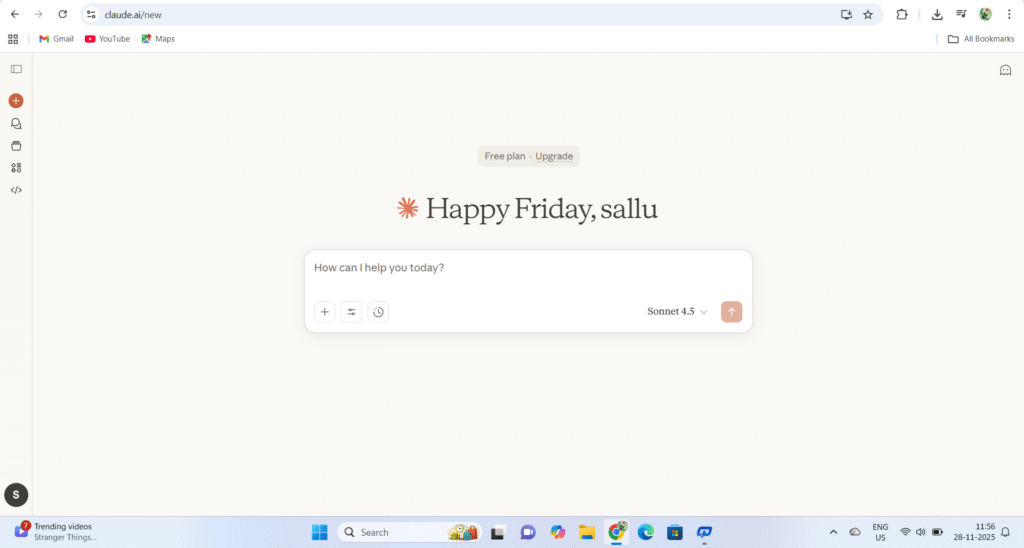
Claude AI is an artificial intelligence assistant developed by Anthropic, a company founded by former OpenAI researchers with a specific focus on AI safety and reliability. Unlike some AI tools that prioritize speed or creativity above all else, Claude’s design emphasizes clarity, logical reasoning, and helpful explanations—qualities that make it particularly valuable in educational contexts.
Why Students Love Claude:
Strong Understanding of Code
For those studying programming, Claude AI for coding students offers exceptional capabilities. It doesn’t just generate code—it explains the logic behind every function, helps debug errors with detailed reasoning, and can walk through algorithms step-by-step. Whether someone is learning their first programming language or tackling advanced data structures, Claude’s explanations maintain accuracy while remaining accessible.
Easy, Clear Explanations
The ability to explain complex topics in simple language sets Claude apart. When a student asks how to use Claude AI for study purposes, the answer often comes back to this core strength: Claude takes abstract or technical concepts and presents them in ways that connect with what students already understand, building knowledge progressively.
Great for Assignments and Research
While Claude shouldn’t write entire assignments (more on academic integrity later), it excels as an AI academic support tool that helps students understand what assignments are asking for, suggests research directions, and provides frameworks for organizing thoughts. This Claude AI for homework approach focuses on developing understanding rather than just providing answers.
Helps with Debugging
For computer science students, the ability to paste code and ask “What’s wrong with this?” is invaluable. Claude AI for coding assignments analyzes code logic, identifies errors, and explains not just what’s broken but why the error occurred and how to prevent similar issues in the future.
Supports Long Documents
Claude can process extensive texts—full chapters, research papers, or lengthy code files. This makes it exceptional for AI for research, as students can upload substantial materials and ask specific questions about content buried deep within documents.
Why Claude AI Is Perfect for Students
Understanding why this particular AI study assistant has gained such popularity among students requires looking at the specific benefits it delivers:
Helps Understand Complex Topics
Whether someone is grappling with quantum physics, object-oriented programming, or economic theory, Claude AI learning guide approaches deliver explanations that build understanding layer by layer. It recognizes when concepts require prerequisite knowledge and fills those gaps automatically.
Provides Simple Explanations
The ability to adjust explanation complexity based on the student’s level makes Claude exceptionally accessible. A beginner can request “Explain this like I’m completely new to the subject,” while advanced students can dive into technical details. This flexibility makes it one of the best AI for learning tools available.
Great for Coding, Writing, and Research
Versatility matters. Students don’t need one tool for programming help, another for essay writing, and a third for research assistance. Claude AI writing help, coding support, and research capabilities exist in one interface, streamlining the learning workflow.
Makes Studying Faster
Time-saving AI tools like Claude don’t just provide quick answers—they help students learn concepts more efficiently. Instead of spending hours confused about a topic, students can clarify understanding in minutes, then spend saved time on practice and deeper exploration.
Zero Plagiarism in Answers
Claude generates explanations uniquely for each query rather than pulling from a database of pre-written responses. This means the learning is genuine, and when students express concepts in their own words after understanding, their work remains original.
Helps Prepare Notes, Summaries, and Presentations
From creating AI-powered notes for exam preparation to organizing presentation content logically, Claude AI for notes making and Claude AI for presentations transforms how students prepare study materials. The organized, clear output serves as excellent reference material for future review.
How Students Actually Use Claude AI: A BCA Student’s Workflow
Real-world application reveals Claude’s true value. Here’s how one BCA student integrates this AI study companion into their daily learning routine:
4.1 Learning Java with Claude
Java’s object-oriented concepts confuse many beginners. Here’s how Claude AI for beginners makes these concepts accessible:
Understanding OOP Concepts
Rather than memorizing definitions, students ask Claude to explain object-oriented programming principles with real-life analogies. For example: “Explain classes and objects in Java like you’re describing how cars work in the real world.”
Claude responds with accessible comparisons: “Think of a class as a blueprint for building cars—it defines what properties every car has (color, model, speed) and what actions cars can perform (accelerate, brake). An object is an actual car built from that blueprint—your red Toyota is one object, your friend’s blue Honda is another. Both follow their class blueprint but have different specific values.”
This approach to using Claude AI for studying makes abstract programming concepts tangible and memorable.
Creating Beginner Java Programs
Students request: “Create a simple Java program that demonstrates inheritance, and explain every line.” Claude provides:
- Complete, working code
- Line-by-line explanations
- Comments explaining the purpose of each section
- Suggestions for modifications to deepen understanding
Getting Help With Core Concepts
Specific areas where Claude AI tutorial approaches excel include:
- Loops and arrays: Understanding iteration logic and data structure manipulation
- String operations: Mastering text processing and manipulation methods
- Error debugging: Learning to read stack traces and identify logical errors
- Assignment completion: Breaking down complex requirements into manageable steps
- Mini-project ideas: Getting suggestions for projects that practice specific skills
Simplifying Textbook Content
Dense textbook explanations often confuse rather than clarify. Students use Claude AI for faster studying by pasting confusing textbook sections and asking: “Explain this in simpler terms” or “What’s the key point this textbook is trying to make?”
My experience using this tool :
here what happen when I try this tool as i am a BCA student i am learning java now i watch videos from Youtube where they share the basic information and explain and after listening to them i ask Claude to give me some programs to practice on this topic
First step : the basic concept of java are the variables datatypes and types of conversions in java which i have learned so after understanding the basic about these topic I head over to Claude ai and type this prompt
Prompt : act as a proffessional programmer and expert in java programming language who has and 5+ years of experience. who knows everything from basics to advance your duty is to provide me the practicing programs on different concepts in java which i ask you or tell you according to that you have to assign me the programs so that i can get better in that topic by practicing programs around that topic
When you paste this prompt it will act as your personal mentor in java programming claude will guide you Throughly just like a Professional
Follow up prompt : I have just learnt about the data types and variables in java i wanted you to assign me 10 programs on these 2 topics for practicing
Here are the 10 Programs that claude will provide you :
📋 Practice Programs: Data Types & Variables in Java
Program 1: Variable Declaration and Initialization
Difficulty: ⭐ Easy
Problem: Create a Java program that declares variables of all primitive data types (byte, short, int, long, float, double, char, boolean) and initialize them with appropriate values. Print all variables with meaningful labels.
Concepts Covered: All 8 primitive data types, variable declaration, initialization
Expected Output Example:
Byte value: 100
Short value: 32000
Integer value: 2147483647
...
Program 2: Calculate Simple Interest
Difficulty: ⭐ Easy
Problem: Write a program to calculate Simple Interest. Declare variables for principal amount, rate of interest, and time period. Calculate and display the simple interest.
Formula: SI = (P × R × T) / 100
Concepts Covered: int/double data types, arithmetic operations, meaningful variable names
Sample Input: Principal = 10000, Rate = 5.5, Time = 2 years
Program 3: Swap Two Numbers
Difficulty: ⭐⭐ Easy-Medium
Problem: Write a program to swap two integer variables without using a third variable. Display values before and after swapping.
Concepts Covered: int data type, arithmetic operations, variable manipulation
Expected Output:
Before Swap: a = 10, b = 20
After Swap: a = 20, b = 10
Program 4: Area and Perimeter Calculator
Difficulty: ⭐⭐ Medium
Problem: Create a program that calculates both area and perimeter of a rectangle. Use appropriate data types for length, width, area, and perimeter. Use final keyword for a constant PI value and also calculate area and circumference of a circle.
Concepts Covered: double data type, final keyword (constants), multiple calculations
Hint: Use final double PI = 3.14159;
Program 5: Data Type Range Finder
Difficulty: ⭐⭐ Medium
Problem: Write a program that displays the minimum and maximum values that can be stored in byte, short, int, and long data types using wrapper class constants.
Concepts Covered: Understanding data type ranges, wrapper classes (Byte, Short, Integer, Long)
Expected Output Example:
Byte: Min = -128, Max = 127
Short: Min = -32768, Max = 32767
...
Hint: Use Byte.MIN_VALUE, Byte.MAX_VALUE, etc.
Program 6: Temperature Converter
Difficulty: ⭐⭐ Medium
Problem: Create a program that converts temperature from Celsius to Fahrenheit and Kelvin. Store the Celsius value in a variable and calculate the other two.
Formulas:
- Fahrenheit = (Celsius × 9/5) + 32
- Kelvin = Celsius + 273.15
Concepts Covered: float/double data types, type casting, arithmetic operations
Program 7: Character and ASCII Operations
Difficulty: ⭐⭐ Medium
Problem: Write a program that takes a character variable, displays the character, its ASCII value, the next character, and the previous character in the ASCII sequence.
Concepts Covered: char data type, type casting between char and int, ASCII values
Sample Output for input ‘M’:
Character: M
ASCII Value: 77
Next Character: N
Previous Character: L
Program 8: Boolean Logic and Conditions
Difficulty: ⭐⭐⭐ Medium
Problem: Create a program that declares integer variables for a student’s marks in 3 subjects. Use boolean variables to check:
- Is the student passing in all subjects? (marks >= 40)
- Did the student score above 90 in any subject?
- Is the average above 75?
Print all boolean results.
Concepts Covered: boolean data type, logical operations, relational operators
Program 9: Salary Calculator with Deductions
Difficulty: ⭐⭐⭐ Medium-Hard
Problem: Write a program to calculate an employee’s net salary. Declare variables for:
- Basic salary (double)
- HRA percentage (float) = 20%
- DA percentage (float) = 15%
- Tax percentage (float) = 10%
Calculate gross salary (Basic + HRA + DA) and net salary (Gross – Tax). Display all values properly formatted.
Concepts Covered: double/float types, percentage calculations, multiple operations
Program 10: Type Casting and Overflow
Difficulty: ⭐⭐⭐⭐ Hard
Problem: Write a program that demonstrates:
- Implicit casting (widening): byte → short → int → long → float → double
- Explicit casting (narrowing): double → int (show data loss)
- Overflow: Add 1 to the maximum value of byte and observe the result
Display each conversion with clear labels showing the original and converted values.
Concepts Covered: Type casting, widening/narrowing conversions, overflow behavior, data type hierarchy
Example Output:
=== Implicit Casting ===
byte value: 100
Converted to int: 100
...

=== Explicit Casting ===
double value: 9.99
Converted to int: 9 (decimal part lost)

=== Overflow Demo ===
Max byte value: 127
After adding 1: -128 (overflow occurred)
🎯 Coding Best Practices to Follow:
- Use meaningful variable names (e.g.,
principalAmountinstead ofp) - Follow camelCase naming convention for variables
- Use appropriate data types (don’t use
intwhenbyteis sufficient) - Add comments explaining your logic
- Use
finalkeyword for constants - Proper formatting and indentation
📝 How to Approach:
- Start with Program 1 and work sequentially
- Write the code yourself – don’t copy-paste
- Test with different inputs
- Try to optimize after your first working solution
- Come back to me if you’re stuck on any program! :
4.2 Learning Python with Claude
Python’s reputation as beginner-friendly doesn’t mean learning it is always smooth. Claude AI for coding students helps navigate common challenges:
Understanding Python Basics
Fundamental concepts like variables, loops, functions, lists, and dictionaries form Python’s foundation. Claude provides:
- Clear definitions with practical examples
- Interactive learning through suggested practice exercises
- Common mistake warnings based on typical student errors
- Real-world use cases showing why each concept matters
Working with Python Libraries
Advanced Python requires understanding libraries. Students ask Claude to explain:
- NumPy: Array operations and numerical computing
- Pandas: Data manipulation and analysis
- Matplotlib: Data visualization and plotting
For each library, Claude AI step-by-step guidance includes installation instructions, basic syntax, and progression from simple to complex examples.
Practicing Python Coding
Rather than searching for practice problems online, students ask: “Give me 10 Python exercises for practicing list comprehensions, from easy to hard.” Claude generates custom practice sets tailored to current skill levels.
Building Small Projects
Project-based learning cements understanding. Students work with Claude to build:
- Simple calculators: Understanding input/output and functions
- To-do list applications: Working with data structures and file handling
- Data analysis tools: Applying Pandas and Matplotlib for real insights
Claude AI for project presentations helps document these projects professionally, explaining design decisions and implementation details.
4.3 Claude for Solving Doubts & Debugging
This represents perhaps Claude’s most immediately valuable application for student-friendly AI tools:
Error Fixing Process
The workflow is straightforward:
- Student encounters an error in their code
- They paste the code into Claude with the error message
- Claude identifies the problem, explains why it occurred, and provides the corrected code
- Crucially, Claude explains the reasoning behind the fix
Optimization Suggestions
Beyond fixing errors, Claude suggests more efficient approaches: “Your code works, but here’s a way to accomplish the same thing with better performance and readability.”
Line-by-Line Code Explanation
For code students don’t fully understand (whether from classmates, Stack Overflow, or textbooks), Claude AI academic writing guide principles apply to code explanation: clear, structured, comprehensive breakdowns that build understanding.
Understanding Runtime and Logic Issues
When code runs but produces wrong results, Claude helps identify logical flaws in algorithm design, explaining where reasoning went wrong and how to approach the problem correctly.
4.4 Claude for Assignments, Notes & Study Planning
Beyond coding, Claude excels as a comprehensive AI academic support resource:
Creating Exam Notes
Students request: “Create concise notes on [topic] suitable for exam review.” Claude produces organized summaries highlighting key concepts, important formulas, and likely exam questions. This represents smart study apps at their most effective—transforming lengthy chapters into focused review materials.
Generating Topic Summaries
For subjects with extensive reading requirements, using Claude AI for summaries turns 50-page chapters into digestible overviews that capture essential points without losing critical details.
Preparing Examination Answers
Students practice writing short answers by asking Claude: “Give me a 5-mark answer format for explaining [topic].” This helps understand how to structure responses effectively for maximum marks.
Planning Study Routines
Claude AI productivity tips include requesting weekly study schedules: “I have exams in these five subjects over the next three weeks. Create a balanced study plan that covers all topics adequately.”
Creating Presentation Content
For group projects and presentations, Claude AI for presentations helps:
- Organize information logically
- Suggest compelling opening hooks
- Create clear section transitions
- Develop conclusion summaries
24/7 Personal Tutor Availability
Unlike human tutors with limited hours, this homework helper AI is always accessible. Studying at 2 AM before an exam? Claude is available. Confused about homework during weekend? Claude is there. This availability transforms how students approach learning challenges.
Claude AI Tutorial: How Students Should Use It (Step-by-Step Guide)
Maximizing Claude’s benefits requires understanding effective usage strategies. This step-by-step Claude AI guide for students outlines best practices:
Step 1: Start With Clear, Specific Prompts
Vague questions yield vague answers. Specificity matters enormously in how students can use Claude AI for homework and learning.
Poor Prompt: “Tell me about Java”
Better Prompt: “Explain inheritance in Java with a real-life example that a beginner would understand. Then show me a simple code example demonstrating the concept.”
Example prompts that work well:
- “Teach me Python dictionaries like I’m a complete beginner who’s never programmed before”
- “I’m preparing for a BCA exam on data structures. Explain linked lists, including advantages over arrays, with diagrams described in words”
- “Break down this chemistry equation step-by-step: [equation]”
Step 2: Request Multiple Examples
Understanding deepens through varied examples. Claude AI prompt examples for beginners should include requests like:
“Give me three examples of [concept]: one very simple, one intermediate, and one advanced. Add comments explaining each example.”
For code specifically: “Show me a Python function that [does X]. Include comments explaining what each line does and why you wrote it that way.”
Step 3: Practice Coding With Claude
Active learning beats passive reading. Best Claude AI prompts for students include practice generation:
For Java: “Give me 10 Java loop exercises progressing from basic to challenging, with solutions I can check my work against.”
For Python: “Create 5 Python practice problems focusing on dictionary operations. Give me the problem statements first, then solutions on the next prompt.”
For Any Language: “Generate coding challenges that test [specific concept] at [my skill level].”
Step 4: Debug Your Code Interactively
When code doesn’t work, the debugging process with Claude looks like:
- Paste the code: Include the entire relevant section
- Describe the problem: “This gives me [error message]” or “This outputs [wrong result] when it should output [correct result]”
- Ask for explanation: “Fix this error and explain why it occurred and how your solution works”
- Request learning: “What concept do I need to understand better to avoid this kind of error in the future?”
This approach transforms frustrating debugging sessions into learning opportunities, making Claude AI tips for students particularly valuable for growing programming skills.
Step 5: Build Projects With Guidance
Project-based learning cements understanding. The process:
Request Project Ideas: “Suggest 3 beginner-friendly Python projects that would help me practice functions, lists, and file handling.”
Get Implementation Guidance: “I want to build [project]. Give me a step-by-step breakdown of what I need to implement, starting with the simplest version.”
Understand Each Component: “Explain this part of the code in detail: [paste section]”
Add Features Progressively: “My basic version works. What features could I add to make it more sophisticated and learn new concepts?”
This incremental approach, using Claude AI workflow for students, builds complex projects without overwhelming beginners.
Step 6: Create Study Materials
Exam preparation becomes more effective with AI-powered notes:
Request Focused Notes: “Create exam-ready notes on [chapter/topic], emphasizing concepts likely to appear in BCA semester exams.”
Generate Practice Questions: “Give me 10 potential exam questions on [topic] with brief answer outlines.”
Simplify Complex Chapters: “This chapter on [topic] is 40 pages. Extract the key concepts I must understand, with brief explanations of each.”
Format for Different Question Types: “How would I answer ‘[question]’ in short answer format versus essay format?”
Claude AI for exam preparation excels at creating these customized study resources that match specific course requirements and exam formats.
Claude AI vs Other AI Tools for Students
Understanding different AI tools helps students choose the right tool for each task. Here’s an honest comparison:
| Feature | Claude AI | ChatGPT | Google Gemini | GitHub Copilot |
|---|---|---|---|---|
| Logical Reasoning | Excellent | Good | Good | Limited |
| Long Explanations | Excellent | Good | Good | Not designed for this |
| Code Explanation | Excellent | Very Good | Good | Minimal |
| Creative Writing | Good | Excellent | Good | Not designed for this |
| Latest Information | Limited | Limited | Excellent | N/A |
| Real-time Code Completion | No | No | No | Excellent |
| Document Analysis | Excellent | Good (with Plus) | Good | No |
| Academic Focus | Strong | Moderate | Moderate | Code-specific |
Claude AI = Best for Logic + Long Explanations
When someone needs detailed, step-by-step explanations that maintain logical consistency throughout, Claude AI vs ChatGPT for students often favors Claude. Its explanations rarely skip steps or make logical leaps that confuse learners.
ChatGPT = Good for Creativity
For brainstorming essay topics, generating creative project ideas, or exploring unconventional approaches, ChatGPT’s strength in creative thinking shines. It’s also more conversational in tone, which some students prefer.
Google Gemini = Fresh Data + Research
Since Gemini integrates with Google’s search capabilities, it excels when questions require current information—recent events, latest research findings, or updated statistics. For best AI for learning that needs real-time data, Gemini has advantages.
GitHub Copilot = Best for Real-time Coding
While not typically used for learning, Copilot integrates directly into code editors, suggesting completions as students type. However, for understanding concepts, Claude AI vs ChatGPT for academic use better serves educational goals since these tools focus on explanation rather than just code generation.
The Practical Recommendation:
Many successful students don’t limit themselves to one tool. They use Claude for detailed concept explanation and debugging, ChatGPT for brainstorming and creative tasks, Gemini for research requiring current information, and Copilot for coding productivity. Understanding what Claude AI can do for students versus what other tools provide allows strategic tool selection.
Best Prompts for Students Using Claude AI
Effective prompting separates mediocre results from exceptional ones. Here are proven Claude AI prompts for students across different use cases:
For Understanding New Concepts
“Explain [concept] in the simplest way possible, as if teaching someone who’s never heard of it before. Use real-life analogies.”
This prompt ensures explanations start from zero assumptions, building understanding from familiar foundations.
“I’m studying [topic] and stuck on [specific part]. Break this down into smaller steps and explain each one.”
When specific confusion points exist, targeting them directly yields better results than general topic requests.
For Code Learning
“Break this [language] program into steps and explain what each section does and why: [paste code]”
Understanding existing code is often harder than writing new code. This prompt helps dissect complex programs.
“Give me a [language] coding challenge that tests [concept]. After I attempt it, I’ll show you my solution and you can provide feedback.”
Active practice with feedback loops accelerates learning more than passive example review.
“Teach me [programming concept] like a beginner. Include common mistakes students make and how to avoid them.”
Learning what not to do is as valuable as learning correct approaches.
For Exam Preparation
“Create condensed notes for this chapter suitable for BCA exam review: [paste chapter content or summary]”
Transforms lengthy materials into focused review content using Claude AI for notes making effectively.
“Give me 10 potential exam questions on [topic] ranging from easy to challenging. Include brief answer outlines.”
Practicing with predicted questions builds confidence and identifies knowledge gaps.
“This is a past exam question: [question]. Explain how to approach answering it step-by-step.”
Learning question-answering strategies improves performance beyond just knowing content.
For Assignments and Projects
“I have an assignment to [requirement]. Help me understand what’s being asked and suggest an approach, but don’t write the full answer.”
Maintains academic integrity while getting clarification on confusing assignment requirements.
“Review my logic for this project: [describe approach]. Point out potential issues or suggest improvements.”
Getting feedback on planning before implementation saves time fixing problems later.
For Research and Writing
“I’m writing an essay on [topic]. Help me create an outline with main points and supporting arguments.”
Structure before writing produces more coherent papers. This represents effective Claude AI academic writing guide usage.
“This is my essay draft: [paste draft]. Review it for clarity, logic, and organization. Suggest specific improvements.”
Revision with AI assistance helps students recognize patterns in their writing that need work.
General Learning Enhancement
“Explain the connection between [concept A] and [concept B]. Why are they taught together?”
Understanding relationships between concepts builds deeper knowledge networks.
“What are the 3 most important things I need to understand about [topic] to build a solid foundation for advanced study?”
Identifying core concepts focuses study efforts on what matters most.
These best ways to use Claude AI in school emphasize understanding over answer-getting, which produces better long-term learning outcomes.
Limitations of Claude AI (Being Honest About Reality)
While Claude is powerful, understanding its limitations helps students use it appropriately and avoid potential pitfalls:
Sometimes Refuses Advanced Requests
Claude has built-in safety measures that occasionally result in refusing to answer certain types of questions, particularly those that might be used to circumvent academic integrity rules. If asking for complete assignment solutions, Claude may decline and suggest learning-focused alternatives instead.
Needs Clear, Well-Structured Prompts
Ambiguous or unclear questions often yield less helpful responses. This isn’t a limitation unique to Claude—it’s true of all AI tools—but it means students need to develop prompting skills. Think of it as learning to ask good questions, which is itself a valuable skill.
Should Not Write Complete Assignments
Using AI to write entire essays or problem sets violates academic integrity standards at most institutions. Claude is designed to help students learn and understand, not to do their work for them. How students can use AI safely involves using these tools as learning aids, not replacement workers.
Must Cross-Check Facts
Like all AI systems, Claude occasionally makes factual errors or outdated statements. Particularly for science, history, or current events, students should verify important facts through authoritative sources. This is good research practice regardless of whether AI is involved.
Does Not Replace Real Coding Practice
Reading code explanations builds understanding, but programming skill requires writing code. Claude can explain every concept perfectly, but students only develop true proficiency through hands-on practice, making mistakes, and fixing them. The best AI tools help facilitate practice but can’t replace it.
Limited Current Events Knowledge
Claude’s training data has a cutoff date, meaning very recent developments, latest research, or current events may not be accurately reflected. For topics where recency matters, students should supplement with current sources or use tools like Google Gemini that have internet access.
Can’t Access External Resources Directly
Unless students paste content directly, Claude can’t browse websites, access specific papers, or view online resources. For comprehensive research, it works best as one tool in a larger research process.
Understanding these limitations helps set realistic expectations and use Claude AI free version tutorial guidelines appropriately—as a powerful learning tool with specific boundaries.
Who Am I and Why Listen To Me :

Written by sahil sheikh with 3+ years of knowledge in coding ,programming and wordpress. I also have 2+ years of experience in the AI field I use multiple AI tools for different Topics and for different works I share ideas and advices which I have used practiced , tried and tested.
I have helped over 15 individual they all are my class mates to i have helped them by providing the prompts , how to use claude to understand concept , how claude can help in learning and much more
Conclusion
The integration of AI tools for students into modern education represents one of the most significant shifts in how learning happens. Among these classroom AI tools, Claude AI has distinguished itself through clarity of explanation, depth of reasoning, and genuine helpfulness that extends across multiple disciplines.
For students wondering how to use Claude AI for study purposes, the answer lies not in finding shortcuts but in using it as a force multiplier for genuine learning. It clarifies confusing concepts, provides practice opportunities, offers debugging assistance, and helps organize knowledge—all activities that deepen understanding rather than replace it.
The BCA student whose experiences informed much of this guide shares a final reflection: “Claude helped me understand Java and Python concepts faster during my BCA journey than anything else. But the key was using it to learn, not just to get answers. I’d work through problems myself first, then use Claude to check my thinking and fill knowledge gaps. That combination of effort plus smart tool use made all the difference.”
This approach—effort paired with intelligent tool usage—represents the future of education. AI for college students and AI in education more broadly aren’t about replacing traditional learning. They’re about enhancing it, making quality educational support accessible to everyone regardless of access to expensive tutors or resource-rich schools.
For students just starting with this technology, the recommendation is simple: start with one clear goal. Perhaps use Claude to finally understand that programming concept that’s been confusing. Or create exam notes for an upcoming test. Choose one specific application, experiment with prompts, and see how it enhances learning. From there, gradually expand usage as comfort and skill develop.
The most successful students in 2026 and beyond won’t be those who resist AI or those who let it do all their thinking. They’ll be those who strategically leverage AI academic help to learn faster, understand deeper, and achieve more—while maintaining the critical thinking, creativity, and genuine understanding that only human learners can develop.
Have you started using Claude AI for your studies? What subjects or tasks do you find it most helpful for? Share your experiences and favorite prompts in the comments below!
Frequently Asked Questions
Is Claude AI free for students?
Yes, Claude offers a free tier that provides substantial daily usage. For most students, the free version is sufficient for regular study support. A paid Claude Pro subscription is available for those who need higher usage limits or priority access during peak times, but isn’t necessary for typical student use.
Can Claude help with BCA programming subjects?
Absolutely. Claude excels at explaining programming concepts, debugging code, and providing practice exercises for languages commonly taught in BCA programs—Java, Python, C++, and others. Many BCA students find it particularly helpful for understanding object-oriented programming, data structures, and algorithm design.
Is Claude good for Java and Python beginners?
Yes, Claude is excellent for beginners. Its ability to provide clear, simple explanations with real-life analogies makes complex programming concepts accessible. It meets learners where they are, explaining fundamentals without assuming prior knowledge, then progressively building to more advanced topics.
Can Claude solve full assignments?
Claude is designed to help students learn, not to complete their assignments for them. It will explain concepts, help debug code, suggest approaches, and provide example solutions—but it deliberately avoids simply generating complete assignment solutions. This design choice supports academic integrity and ensures students actually develop skills rather than just submitting AI-generated work.
Which AI tool is best: Claude or ChatGPT for students?
Both are excellent but serve slightly different strengths. Claude excels at logical reasoning, detailed explanations, and analytical tasks—making it particularly strong for coding, mathematics, and technical subjects. ChatGPT shines in creative tasks, brainstorming, and conversational interactions. Many successful students use both, choosing the tool that best matches each specific task. For coding explanations and step-by-step logical breakdowns, Claude generally edges ahead. For creative writing, essay brainstorming, or conversational learning, ChatGPT often feels more natural.